A lead comes in at 2:03 PM from a Facebook form. The person lives in Texas and wants a quote for auto insurance.
Your top buyer for that state already hit their daily cap, so the system has to make a decision right away. When nothing happens for even a few seconds, that opportunity starts to lose value.
Using lead management tools, you can control how you capture, check, route, and follow up with every contact.
In this article, you will learn how the best lead management system works and what features actually change results to choose the right setup for your business.
TL;DR
- Lead management tools capture, validate, route, and track leads instantly, so no opportunity loses value.
- High volume, slow follow-ups, bad data, or buying and selling leads signal you need a proper system.
- Different tools serve different roles: CRMs store data, routing platforms move leads, marketplaces trade leads, and tracking tools measure results.
- The best setup includes fast routing, strict validation, flexible rules, and strong reporting for full control.
- Standard Information combines everything together, so you can manage and monetize leads automatically.
How to Know if You Need Lead Management Software
You’ll notice the need for a lead management system when:
Handling High Lead Volume
Volume becomes a problem the moment the leads stop moving instantly.
Every second counts when managing the influx of new leads coming in from web forms. Once a lead waits in a queue, its value drops before anyone even looks at it.
A lead management system checks each record, filters out duplicates, and ranks intent. You need a lead scoring system to prioritize follow-ups, so your team focuses on hot leads.
Buying or Selling Sales Leads
Buying sales leads from vendors or selling them to multiple clients requires speed and pricing control. Each record can go to several buyers at once, so whoever acts first usually wins.
Lead management systems can receive a lead, send partial details to buyers, and collect bids within seconds, which keeps you in the race.
At the same time, it verifies prospect data before the transaction. It checks phone numbers, emails, and duplicates before accepting anything, so you don’t pay for useless records.
In this setup, you’re treating lead data as a liquid asset for brokering. You can decide where each lead goes and how much it’s worth, based on demand and buyer rules.
Experiencing Delays or Missed Opportunities
Delays often start with assigning leads to your team. When routing depends on manual work, new contacts sit untouched while someone decides who gets what.
Through lead management software, that delay disappears since it can apply rules the moment a lead enters. It assigns leads based on capacity, location, or pricing by itself.
Then, when your marketing and sales teams aren’t aligned on response times, follow-ups lag behind.
The system fixes this by triggering timely follow-ups through notifications, SMS, or direct delivery to external tools. It keeps consistent communication through the entire sales process, so every lead moves forward.
Struggling With Data and Lead Quality
Poor data causes more damage than low volume. Many companies struggle with manual lead qualification, resulting in inconsistent decisions and wasted calls.
With a lead management tool, you can block duplicates, filter unwanted records, and check each submission before routing.
Predictive lead scoring further ranks contacts based on behavior and input quality, so your team knows which ones deserve attention first.
You also need to track leads properly to avoid “lead amnesia.” The platform logs every step, so you always know what happened to each record. That structure keeps your process organized and focused on results.
Types of Lead Management Systems
Different systems handle different steps, so understanding how each one works helps you choose the right setup.
CRM-Based Tools
Customer relationship management (CRM) tools focus on storing and organizing information over time. They centralize your customer data, such as:
- Emails
- Calls
- Form submissions
- Notes from past conversations
Everything feeds into your sales pipeline, which is your team’s single source of truth. Each stage shows where a deal stands, from first contact to closed sale.
These tools also support lead nurturing. You can set up sequences that send emails or reminders based on actions. Nurturing leads over time becomes better for longer sales funnel cycles, where buyers take weeks or months to decide.
CRMs also manage the entire customer lifecycle, from first touch to repeat purchase.
Lead Routing and Distribution Platforms
Once a lead comes in, lead routing and distribution platforms check rules and assign it to the right sales reps based on location, skill, or availability.
These systems also build the lead management workflows that drive distribution. For example, one rule might send leads from Texas to a specific buyer, while another sends high-value contacts to senior reps.
Validation happens before routing, so bad records don’t reach your team. Duplicate checks, phone verification, and filters run immediately, which protects time and keeps your team focused on real opportunities.
Marketplace and Affiliate Systems
Marketplace systems focus on buying, selling, and brokering of lead data between different parties. Rather than managing your own contacts, they connect sellers and buyers through a shared platform.
Affiliates generate leads through ads, landing pages, and other marketing campaigns. The system tracks who sent each lead so payments stay accurate. It also helps you monitor which partners bring strong results.
Each lead enters a marketplace where buyers compete based on price and filters. The system then decides where the lead goes based on demand and the rules you set.
You can even see which marketing tactics partners use, such as search ads or social campaigns, and compare performance. Knowing that helps you adjust spending and focus on sources that bring better outcomes.
Tracking and Attribution Tools
Tracking tools focus on understanding what happens before and after a lead enters your system.
Data shows what they did before they signed up, which maps your customer journey step by step. You can see which pages they visited, what they clicked, and how long they stayed.
Systems also analyze lead behavior, such as repeated visits or downloads, to identify intent.
Attribution connects those actions to results, too. You can measure campaign performance and see which sources bring qualified leads.
Key Features to Look for in Lead Management Solutions
Once you understand how different systems operate, you need to consider these features:
Real-Time Lead Routing
Real-time lead routing manages leads the second they are generated. For example, the system can use logic like “If location equals New York and buyer has capacity, send immediately,” so the lead moves promptly.
Fast response increases meaningful conversion dramatically, which makes this the primary way to boost conversion rates. When a lead waits too long, interest drops, and competitors step in first.
Before routing happens, the system checks the data. It asks “Is the phone active?” or “Is this a duplicate?” so your team avoids wasted calls.
Lead Validation and Filtering
Lead validation and filtering decide which leads deserve attention before they ever reach your team. Every record goes through checks that confirm accuracy and fit before anything moves forward.
Validation reviews if the data is functional, and filtering checks if the lead matches your criteria. That means your team focuses only on contacts that can convert leads into actual conversations.
You define what qualifies as acceptable:
- Hard filter: If the phone fails validation, reject instantly.
- Soft filter: If the location matches the target region, mark high priority.
It protects your spend when buying leads, since bad data gets blocked before it enters your system.
Flexible Routing Logic
Flexible routing logic uses rules like “If lead score is high, send to senior rep” or “If buyer budget is reached, route elsewhere.” These decisions rely on setting custom business rules that match how your operation runs.
You need this level of control, especially for enterprise teams that manage verticals, multiple regions, or pricing models. Without that logic, valuable leads end up with the wrong person.
Lead Buying and Selling Capabilities
Lead buying and selling capabilities turn your system into a transaction layer where leads move between partners based on demand and price.
Your platform connects to vendors and buyers through direct integrations, which creates a mechanism for trading potential customers between partners. A lead enters, partial data goes out, and buyers respond within seconds.
The system selects the best match and completes the transfer instantly.
It also opens up more deals. If your team cannot use a lead, you can sell it. When you need more volume, you can buy leads and apply your own filters before accepting them.
Reporting and Performance Tracking
Reporting and performance tracking show what actually happens after a lead enters your system. Real-time deal tracking, for instance, lets you see the health of the business as activity happens.
You can follow each step from contact to close and identify where deals slow down. That insight helps improve your pipeline management by showing exactly where adjustments are needed.
A simple breakdown of your sales performance may look like this:
- 1,000 leads received
- 600 contacted
- 200 qualified
- 50 closed
You can compare individuals, teams, and sources to see what produces results and what needs attention.
Integration and Automation
Manual data entry is a business killer because it slows response time and creates errors before a lead even gets processed. Integration and automation connect your tools.
Once connected, your system pulls data directly from your web forms the moment someone submits.
Automation then handles repetitive tasks:
- Assign leads instantly
- Send follow-ups
- Update records
- Trigger notifications
You can also sync with your marketing automation platform to keep campaigns and lead handling aligned. This setup removes repetitive admin work and improves contact management by handling updates automatically.
Budget Caps and Scheduling Controls
Budget caps and scheduling controls protect both your spend and your lead flow timing. Without limits, you risk receiving more leads than your team can handle or overspending in a short period.
Caps let you manage volume and costs on a per-user or per-month basis, so you stay within budget even when traffic spikes. Scheduling controls, on the other hand, define when leads should enter your system so your team can respond right away.
These settings also help align the spend between sales and marketing teams so both sides operate with the same limits and expectations.
Run Smarter Lead Management Process With Standard Information
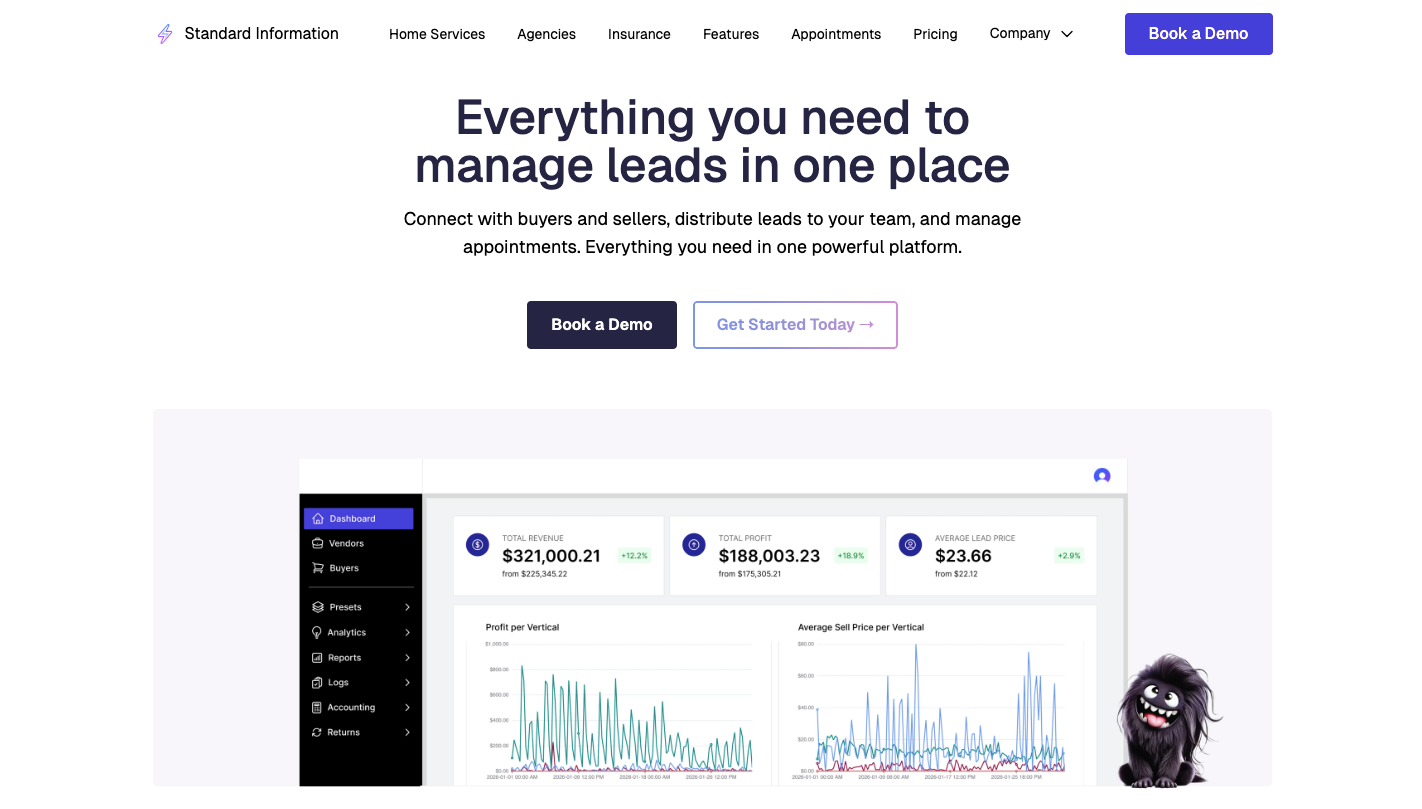
Standard Information is a lead distribution and auction platform built for businesses that need full control over how leads move, get validated, and get sold. It supports the entire sales cycle, from the moment a lead enters to the final outcome.
Compared to other lead management tools, it doesn’t just organize records. It processes, filters, routes, and distributes all the leads automatically based on rules you define.
You can further get these advanced features:
Ping Post Auction System
A lead enters and immediately goes through a bidding process. The system sends partial data to multiple buyers at once, such as location or basic attributes. Buyers respond with bids based on their criteria and budget.
Standard Information compares those responses and selects the highest bidder or best match. Full details are delivered instantly.
By doing that, you increase the value per lead because you allow competition among buyers.
Lead Buying and Selling Controls
You decide which leads enter your system and how they move after that.
For example, you can connect to vendors, apply filters before accepting leads, and reject anything that doesn’t meet your criteria. On the selling side, you control distribution, pricing, and volume.
When your team cannot use certain leads, you can sell them and still create more deals from traffic you already paid for.
Advanced Filtering and Blacklist Features
Filtering happens before leads reach your team, so bad data never becomes a problem later. Standard Information checks each record against rules you define, such as required fields, location, or formatting.
Blacklist features block unwanted entries from entering again. You can stop leads based on phone numbers, email patterns, or known invalid inputs.
For example, you can reject duplicate entries using email or phone, block leads tied to known issues, or prevent invalid formats from entering.
Real-Time Reporting and Logs
Every action gets recorded as leads move through the system. You can track where a lead came from, how it was processed, and what happened after it was distributed.
Logs provide detailed visibility into each step:
- When the lead entered
- Which buyers received it
- How they responded
- Where the lead ended up
You can review performance at any moment and identify issues quickly. That level of tracking helps you adjust campaigns, fix routing problems, and keep your process running smoothly.
FAQs About Lead Management Tools
What are lead management tools?
Lead management tools control what happens to a lead the moment it enters your system. They validate the data, decide if it should be accepted, route it to the right buyer or team, or even sell it based on demand.
Modern lead management systems also move leads instantly, which makes lead management important when you need speed, control, and visibility across the entire customer journey.
What is the difference between lead management tools and CRM software?
Lead management tools drive sales efforts by routing, filtering, and distributing leads in real time, while CRM systems focus on managing relationships once a lead is assigned to a rep.
What is the best lead management software?
The best lead management software gives you control over how leads get validated, routed, priced, and distributed. It should support buying and selling, apply filters before acceptance, and route leads instantly based on rules.
Systems that only store data fall short when you need to control flow, speed, and outcomes.
What is the difference between lead management tools and marketing automation tools?
Lead management tools decide what happens to a lead when it enters your system, including validation, routing, and distribution. Marketing automation tools handle communication after that point, such as emails and campaigns.