If you've bought or sold leads for any amount of time, you've probably hit this wall:
You want to try out a new lead type — like Solar, Home Services, Legal, or Health — and suddenly it’s a whole tech project.
Requests get made. There's a lot of back and forth. We'll get to it when we can.
All the while, the chance is slipping away.
It shouldn’t be this hard.
One thing I like about the Standard Information platform is how quick it is to add a new lead type. It’s not cutting corners; it's that the platform was made for the users, not the programmers.
If you run many offers or want to be able to try out new areas without slowing things down, this process will make a big difference.
Why Verticals Matter More Than People
- What info your leads have
- What rules to use
- What buyers and sellers need to look for
- How your matching works
If your lead type is hard to change or slow to update, your process gets weak.
If your lead types are easy to control, your business gets flexible.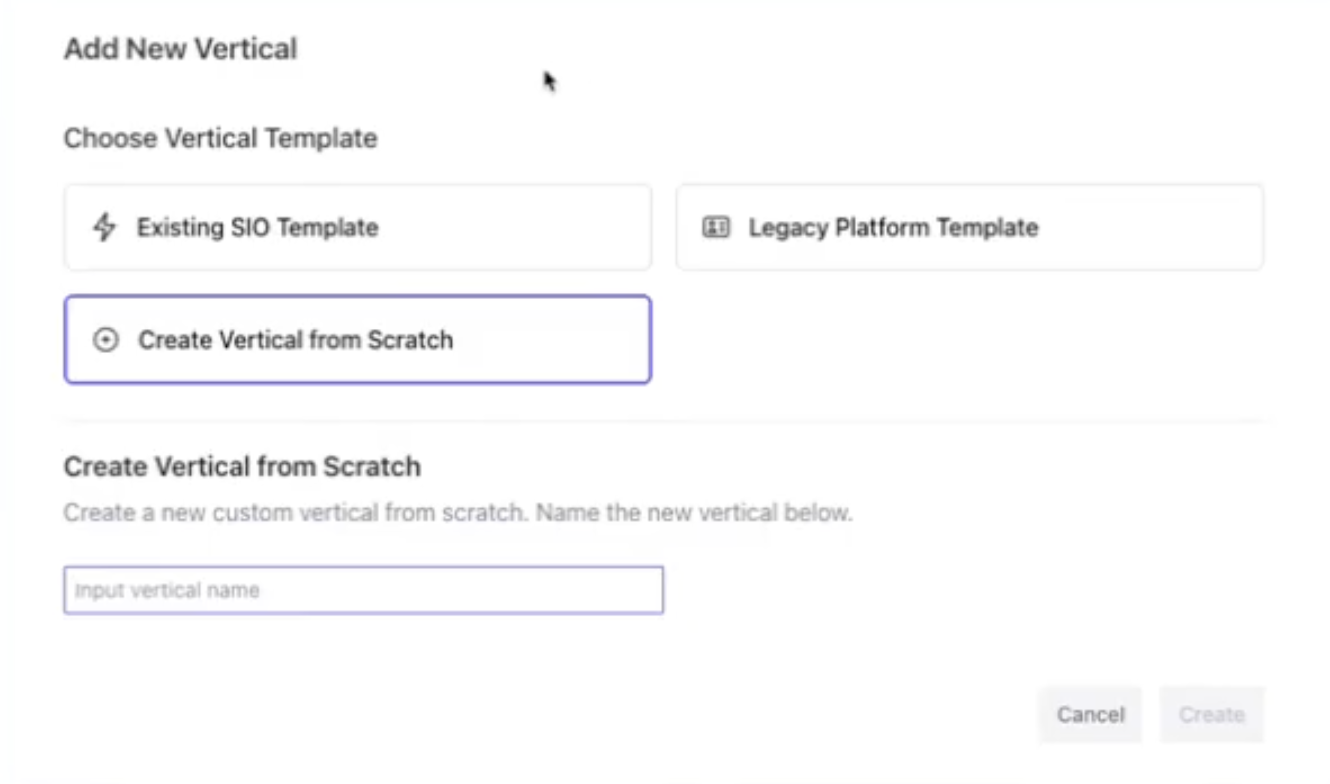
That’s where Standard Information stands out. You can see the whole thing in this youtube video:
📹 Vertical Setup Video
Go to 0:57 – 1:20 to see how it works.
How It Works (In Under 2 Minutes)
Adding a new lead type in Standard Information is almost too easy:
1. Go to Presets → Verticals
This is where you find ready-made setups.
2. Click “Add Vertical”
This opens the window where you start.
3. Pick from SIO’s Ready-Made Setups
This is where it gets good.
You’ll see setups for:
Solar
Legal
Home Services
Auto
Insurance
And more
These setups have all the right info fields you need.
4. Change Anything You Want
Change field names, update what’s needed, add rules — everything is adjustable.
5. Save, and You’re Done
As soon as you click “Save,” that lead type is:
- Ready for sellers to use
- Ready for buyers to use
- Available in Streams
- Working with matching and filters
- All set up in your system
No tech requests.
No waiting for updates.
No rebuild.
Done.
Why This Is Important
1. Agencies Can Work Much Faster
Instead of waiting a week to try a new area, you can start today.
2. Tech Isn’t a Problem Anymore
You shouldn't need programmers just to add a new lead type.
3. Try More Things, Make More Money
The teams that can try more lead types make more money.
This gives you that chance.
4. Scale Easier
Your lead type setups become the base of your work.
If it’s easy to manage, your whole business is easy to manage.
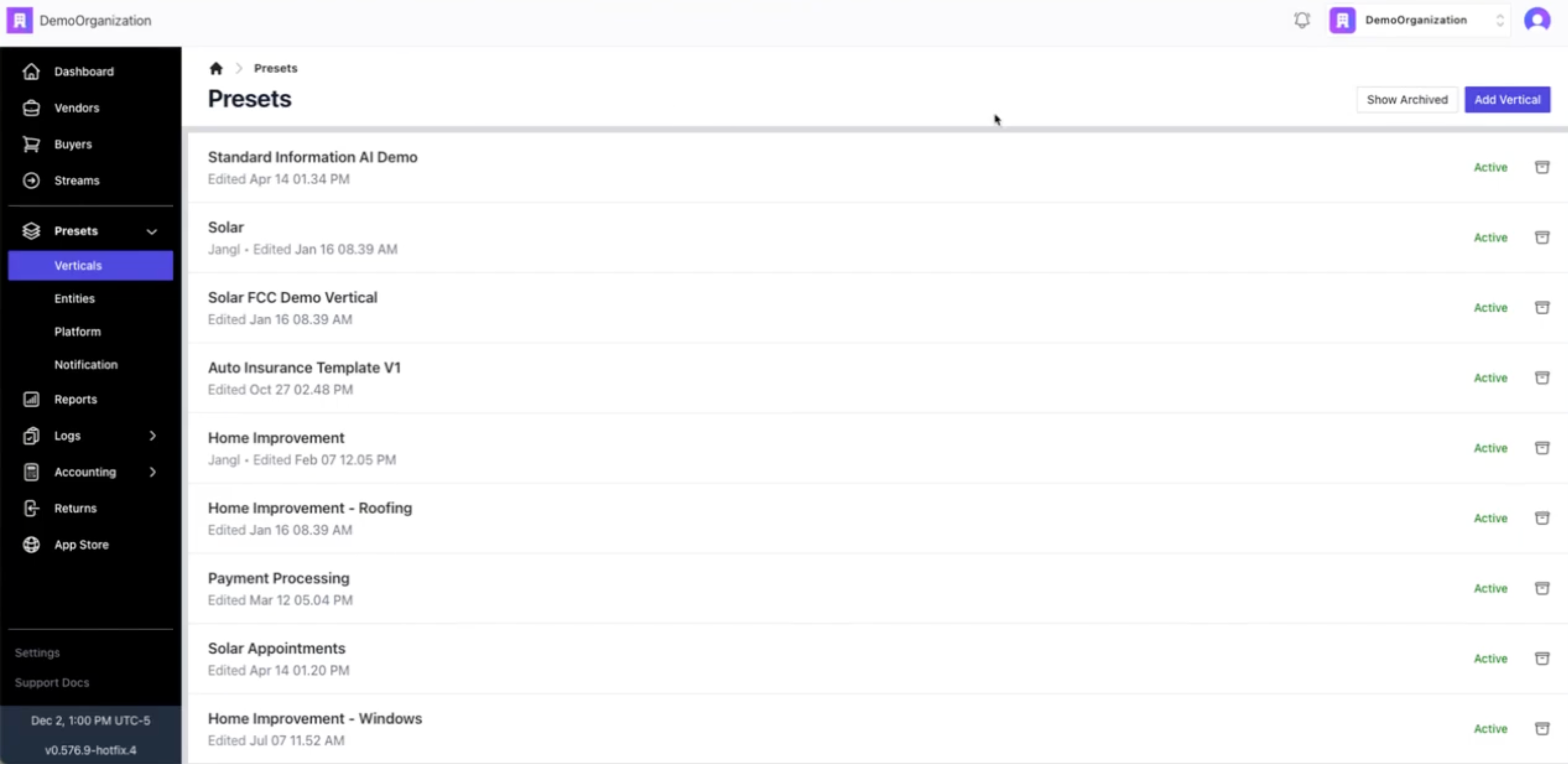
Where to Look in the Video ➡️ 0:57 – 1:20 - Video here
This is where Greg:
Opens Presets → Verticals
Clicks Add vertical
Opens the template dropdown
Makes a new Solar vertical right away
In Short
If it still takes your team days or weeks to add lead types, that’s a problem.
The lead world moves fast.
Your platform needs to be faster.
One click. One setup. A lead type ready to go.
FAQ
1. Can I change a lead type after I make it?
Yes — you can edit every field, rule, and setting anytime.
2. What if my lead type isn’t in any of the setups?
You can make your own from scratch or start with a setup that’s close and change it.
3. Do lead types automatically work with buyer and seller campaigns?
Yes — once you make it, the lead type can be used in campaigns and Streams.
4. Does changing a lead type mess up anything?
No — Standard Information knows how the setup works, so changes go smoothly through the system.
5. Is adding a lead type really live right away?
Yes — as soon as you save, settings, matching, and campaign options update automatically.
Meta Description
How to Create New Lead Verticals in Standard Information [2025]: Launch Solar, Legal, Home Services, or any vertical in minutes using preset templates, customizable schemas, and real-time routing logic. Standard Information vs. LeadProsper, Boberdoo, Leadspedia, Phonexa, ActiveProspect, and PingTree Systems.